

Give Your Bookkeeping Website a 15-Minute Checkup
When was the last time you looked through your own website? Not to change the design or add a new page, but to make sure everything says what you want and works properly.
Websites have a way of slowly getting out of date. You may change a service, update prices, create a new resource, or change how clients reach you. But your website doesn’t always get the memo.
Regular website checks every few months help you find issues before clients do. But you don’t need to make it a big project.
Set a timer for 15 minutes and start with these five things.
1. Start on your homepage
Open your website and try to look at it as if you’ve never seen it before. Within a few seconds, can you tell what you do, who you work with, how you help, and what someone should do next?
You don’t need the perfect headline or clever wording. A potential client just needs to know who you are and if it’s the right fit for them.
While you’re there, look for anything that no longer reflects your business. You might have changed the clients you work with or added or removed a service.
Your homepage should describe the business you have now, not the one you had when you built your website.
2. Check your services
Next, look at the services you have listed. Are you still offering them? Do you offer any services that aren’t mentioned? Has the way you describe or package your services changed?
You don’t have to rewrite your entire Services page every time your business evolves. But someone thinking about working with you should see clearly how you can help them.
Pay particular attention to pricing, packages, and specific promises. Those are easy to update somewhere else and forget about on your website.
3. Click your own buttons
This might be the easiest website check of all: click on everything.
- Try your contact button
- Click your scheduling link
- Test the links in your navigation
- Open any resources or downloads you’ve linked to
- If you have a contact or inquiry form, send yourself a test submission
It’s easy to assume something works because it worked when you originally set it up. Sometimes a broken button isn’t a major technical problem at all. It’s simply an old link you forgot to change.
But to a potential client, the result is the same. They can’t take the next step.
4. Look at your website on your phone
Your website might look great on your computer, but it can seem very different on a smaller screen. Pull it up on your phone and scroll through the main pages.
You don’t need to inspect every pixel. Look for the obvious things: Can you read the text comfortably? Do the images fit properly? Are the buttons easy to tap? Is anything overlapping or cut off? Does the navigation work?
You’re looking for anything that makes you stop and think, “That doesn’t look right.” That’s usually enough to tell you where you need to investigate.
5. Make sure the next step is obvious
Finally, pretend you’ve decided you want to work with this bookkeeper. What do you do next?
Book a consultation?
Fill out an inquiry form?
Send an email?
Learn more about working together?
The exact next step isn’t important. What’s important is that a potential client doesn’t have to hunt for it. Check your homepage, Services page, and Contact page in particular. If someone is ready to take the next step, make it easy for them.
Don’t turn your check-up into a redesign
This is where a 15-minute checkup can quickly become a three-day project. You spot an old sentence. You think the whole section needs a rewrite. Then you wonder if the image should change too. Two hours later, you’re comparing fonts.
That’s not the goal.
Your website doesn’t need to be redesigned every time you check it. Fix the quick things you can fix, and make a note of anything that needs more attention so you can come back to it later.
The purpose of the checkup is simply to answer one question:
Is my website still accurate, working, and making it easy for someone to take the next step?
If the answer is yes, you’re done.
Put the next check-up on your calendar
Your bookkeeping business will keep changing, so your website needs to change as well. But you don’t need to look at it every week.
Set a reminder on your calendar every three to four months. Spend 15 minutes doing the same checks. Regularly making small updates is easier than discovering that half your website mentions a service you no longer offer.
Give Your Website a Quick Checkup
I’ve put these checks into a simple 15-Minute Website Checkup you can keep handy. Set a timer, work through the list and make a note of anything that needs attention.
No redesign required.
You might be wondering
How often should I check my bookkeeping website?
Every three or four months is a good starting point. But make sure to always check when you make changes to your important business info.
Do I need to update my website every time I do a checkup?
No. Sometimes your checkup will confirm that everything is fine. The goal isn’t to change anything; it’s to ensure your website is accurate and works well.
What if I find more than I can fix in 15 minutes?
Write it down and keep going. Fix simple issues while you’re there, then make a separate list for anything that needs more time. Your 15-minute checkup doesn’t have to become another website project.
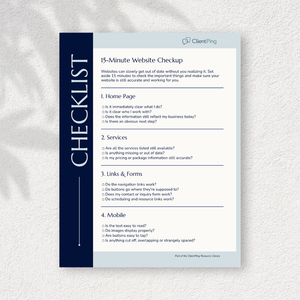
15-Minute Website Checklist
Give your bookkeeping website a quick review with this practical checklist. Spot areas that need attention and find simple ways to make your website more helpful to potential clients.
Get Your Free Ping Starter Kit
Includes a blog post, client email, social posts, and a Quick Start Guide.
More to explore
-
How to Stay in Touch with Clients Without Feeling Like a Bother
Staying in touch doesn’t have to feel uncomfortable or intrusive. A simple, thoughtful approach helps you stay connected in a way that feels natural for both you and your clients.
-
How to Show Clients the Difference You Make
Many bookkeepers do valuable work behind the scenes, making it difficult for clients to see the full impact. Here’s how to share the difference you make—even if you don’t have formal testimonials or dramatic success stories.
-
How to Start Marketing Without a Blank Page
Staying visible doesn’t have to mean constantly creating new content. This post looks at a simpler way to show up without starting from scratch each time.